Patio3D / Client work at RedLayers
Designing
a patio.
Patio3D is an interactive patio configurator. My work covers configuration logic, shareable designs, and admin workflows. I also contribute to the 3D implementation, using AI extensively for that work.
Visit the client product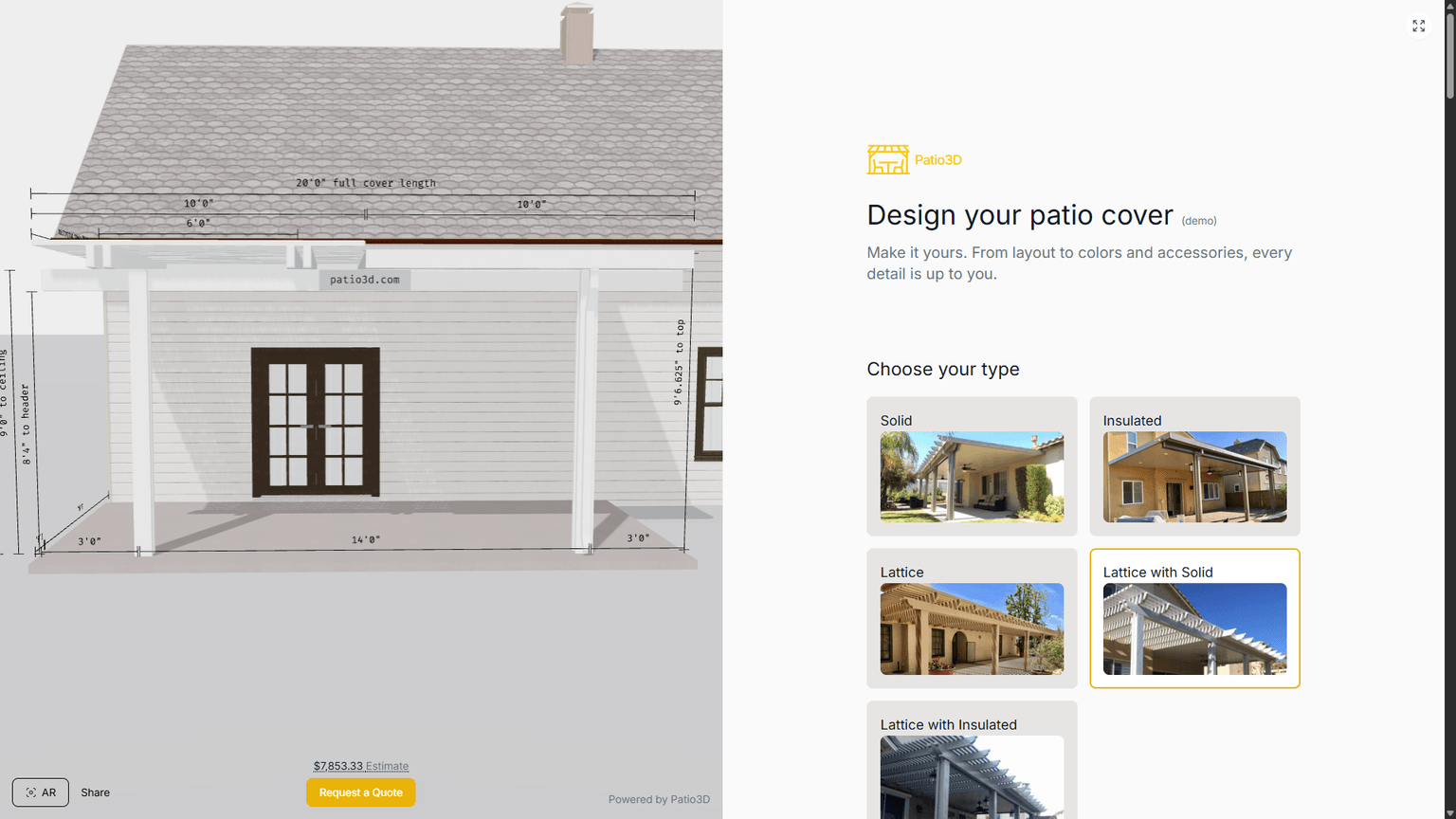
The production configurator: live geometry beside product choices.
3D experienceGeometry and configuration work across patio systems, mainly with help from AI.
Configuration stateProduct choices and restorable, shareable designs.
Behind the interfaceAdmin tools and improvements to slow updates.
- My role
- Lead Frontend Engineer
- My focus
- 3D, state & admin
- Tools
- Nuxt, Vue, Tres.js, Three.js
- Context
- Proprietary client product
Proprietary client product built while I was employed by RedLayers. This case study explains the parts I personally designed, built, maintained, or improved. Source code is not included.
01 / The product
What the product does
People choose the size, roof, materials, and structure of their patio. The model and product options need to stay in sync as those choices change.
I work on configuration and admin tools, improve slow updates, and use AI to help with the 3D features.
02 / A decision in the frontend
Updating after a selection
Address, pricing, and search updates can be expensive. I optimized those paths so meaningful selections trigger dependent updates, instead of every keystroke.
Explore an input
Make a meaningful selection
Update the dependent work
A conceptual sequence illustrating the update behavior, not proprietary implementation code.
03 / Making state portable
A design you can come back to.
I made it possible to save and share a design through its link. The demo below shows the idea: change a choice, then reopen the link.
A small explanation you can play with
One choice. A connected system.
Change the width or roof, then copy the link. The drawing follows your choices, and the URL brings the same setup back.
Your selections are saved in this page’s URL.
The engineering idea. Geometry and interface read the same state. The URL stores the choices needed to restore it.
An original illustration. Built for this portfolio. It is not the production configurator and includes no manufacturer rules, pricing, or proprietary source code.
04 / The rest of my scope
Other parts I worked on
- Worked on dynamic geometry and configuration behavior across multiple patio systems with substantial AI assistance.
- Implemented and maintained admin workflows and product menu logic connected to complex engineering rules.
- Diagnosed and resolved rendering, state synchronization, and performance issues across complex interactive configurations.
Have something in mind?